> ## Documentation Index
> Fetch the complete documentation index at: https://docs.hiddenlayer.ai/llms.txt
> Use this file to discover all available pages before exploring further.

# Asset Scans

From the Asset Scans page, you can click a Model Artifact to view the Detection Summary, Attributes, and related MITRE ATLAS techniques.

<Note>
  **Detection Categories**

  Scan results include a **Detection Category** and **Threat Level** to provide some insight into risks related to the model file. See [Detection Categories](/docs/products/supply-chain/console/supply_chain_severity_levels) for more information.
</Note>

***

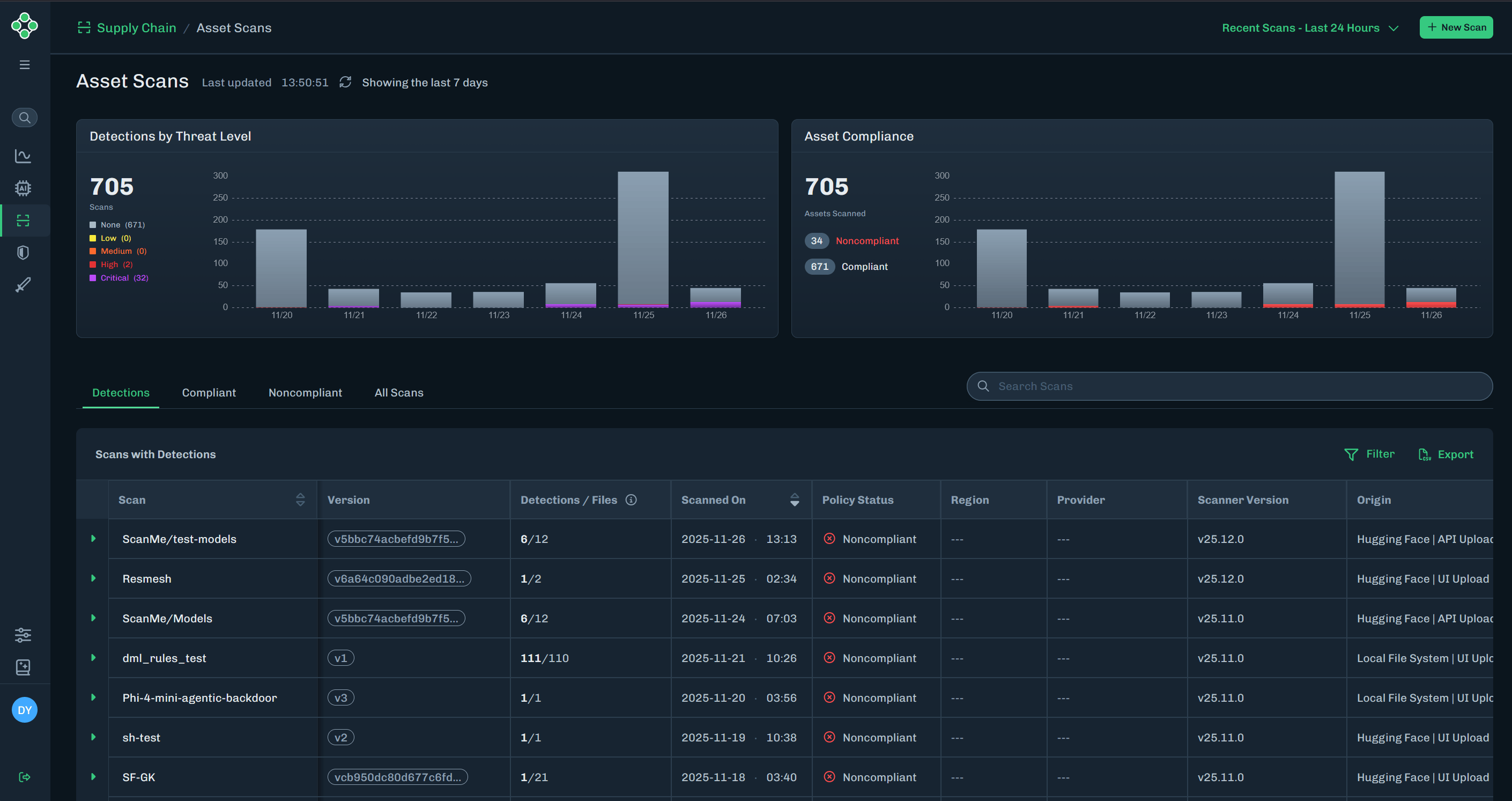
1. In the Console, select **Supply Chain > Asset Scans** in the side navigation.

   * **Detections by Threat Level**: Bar chart for detections, colored by threat level.

     * Bar chart displays the last seven days
     * Displays the total number of scans
     * Threat levels included are: None, Low, Medium, High, and Critical

   * **Asset Compliance**: Bar chart for compliant and non-compliant assets (based on scan data).

     * Bar chart displays the last seven days
     * Displays the total number of assets scanned
     * Compliance data included are: compliant and non-compliant

   <Frame>
     <img src="https://mintcdn.com/hiddenlayer/DsUCbDX4m5h7lBi7/docs/products/supply-chain/console/images/asset-scans-page.png?fit=max&auto=format&n=DsUCbDX4m5h7lBi7&q=85&s=0bfdbf81d85177f1d67b519e7ae94406" alt="Asset Scan Expand Row" width="2820" height="1493" data-path="docs/products/supply-chain/console/images/asset-scans-page.png" />
   </Frame>

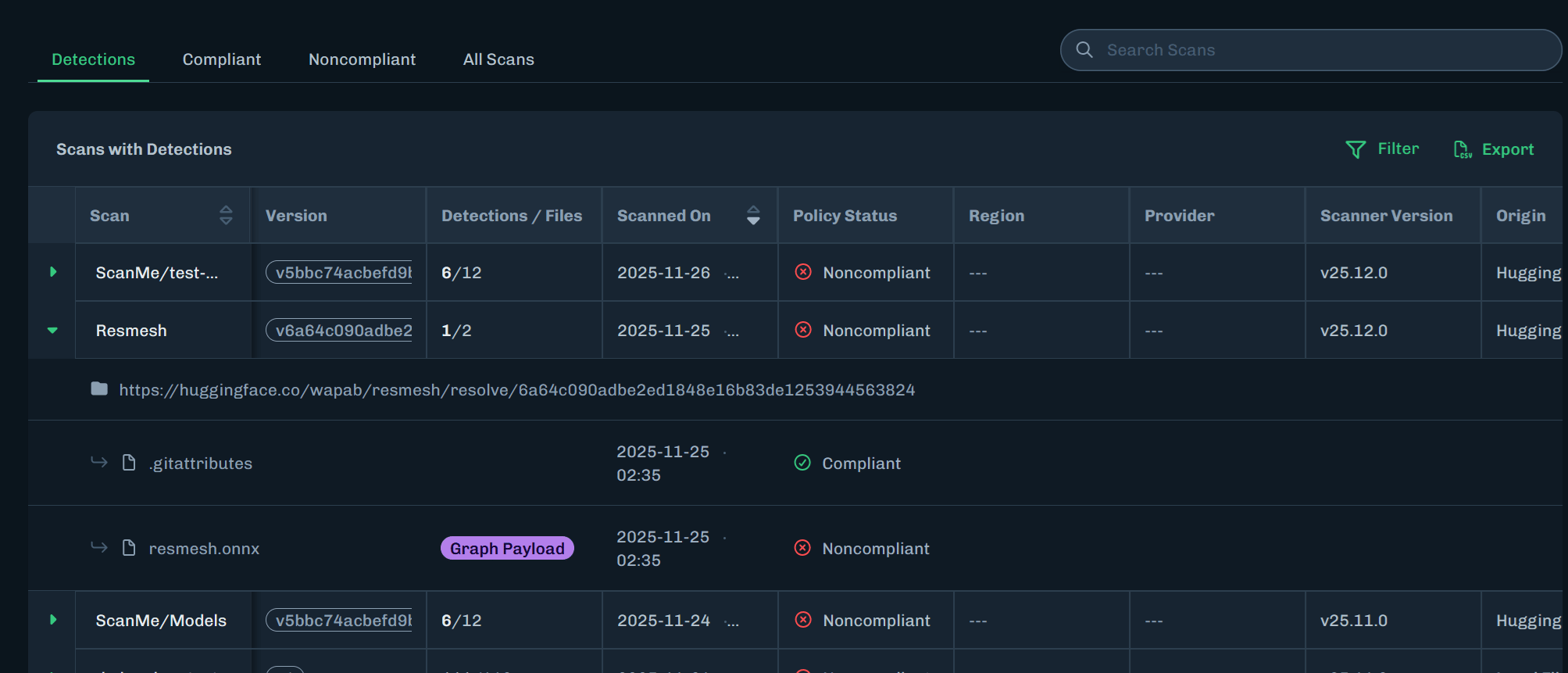
2. Click the green arrow next to the scan name to expand the row and view more information. See [Column Descriptions](#column-descriptions) for information about data in each table column.
   <Frame>
     <img src="https://mintcdn.com/hiddenlayer/DsUCbDX4m5h7lBi7/docs/products/supply-chain/console/images/asset-scans-expand-row.png?fit=max&auto=format&n=DsUCbDX4m5h7lBi7&q=85&s=f898b51f16f50f9a852c0334c1e596ae" alt="Asset Scan Expand Row" width="2007" height="861" data-path="docs/products/supply-chain/console/images/asset-scans-expand-row.png" />
   </Frame>

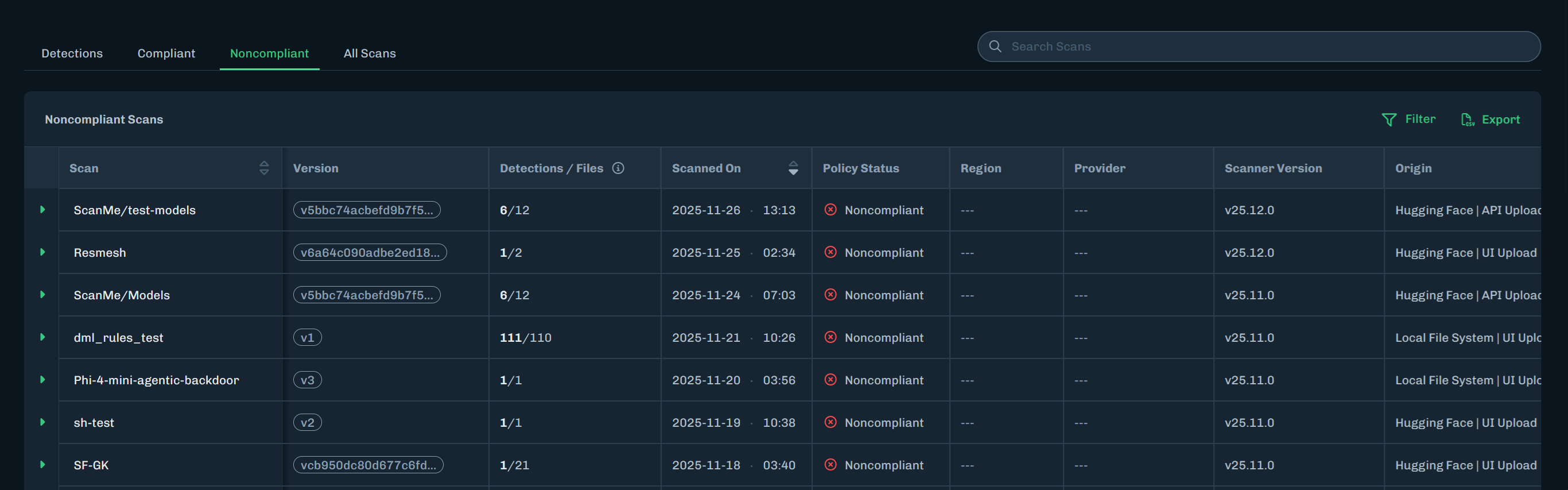
3. Click a tab to display specific model scans.

   * **Detections** - Displays model scans with detections discovered.
   * **Compliant** - Displays model scans that are compliant with the assigned policy.
   * **Noncompliant** - Displays model scans that are not compliant with the assigned policy.
   * **All Scans** - Displays all model scans.
   <Frame>
     <img src="https://mintcdn.com/hiddenlayer/DsUCbDX4m5h7lBi7/docs/products/supply-chain/console/images/asset-scans-select-tabs.png?fit=max&auto=format&n=DsUCbDX4m5h7lBi7&q=85&s=3f89d15cd4468404d832a337b9928e69" alt="Model Scanner page" width="2732" height="853" data-path="docs/products/supply-chain/console/images/asset-scans-select-tabs.png" />
   </Frame>

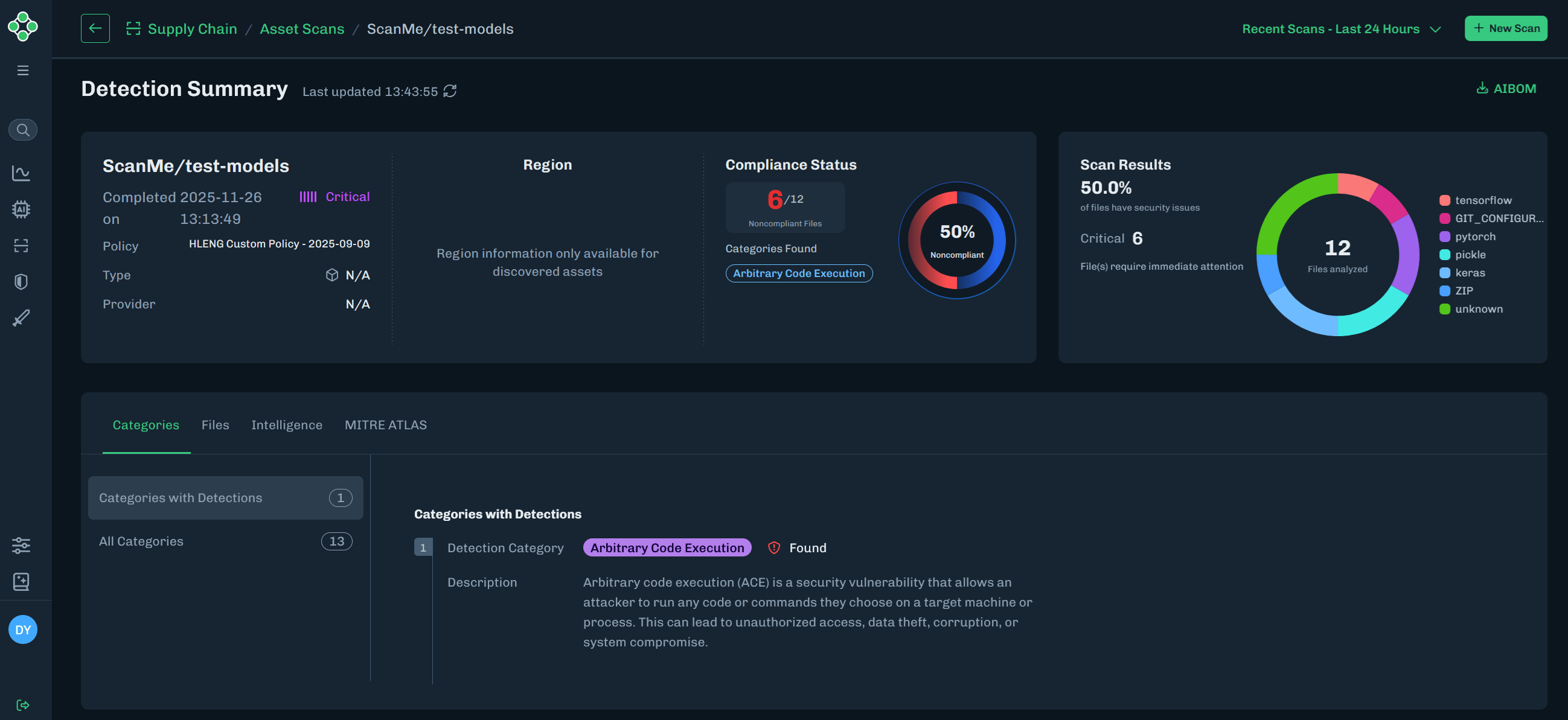
4. Click the green arrow next to Threat Level to view the Detection Summary page that contains model scan information.

   * **Scan summary**: Displays key scan information, including the related policy and compliance status.
   * **Scan Results**: Displays the types of files analyzed, along with the number and percentage of files that have security issues.
   <Frame>
     <img src="https://mintcdn.com/hiddenlayer/DsUCbDX4m5h7lBi7/docs/products/supply-chain/console/images/asset-scans-detection-summary.png?fit=max&auto=format&n=DsUCbDX4m5h7lBi7&q=85&s=4dbf219dabb59480b15f38540e910166" alt="Detection Summary Section" width="2597" height="1193" data-path="docs/products/supply-chain/console/images/asset-scans-detection-summary.png" />
   </Frame>

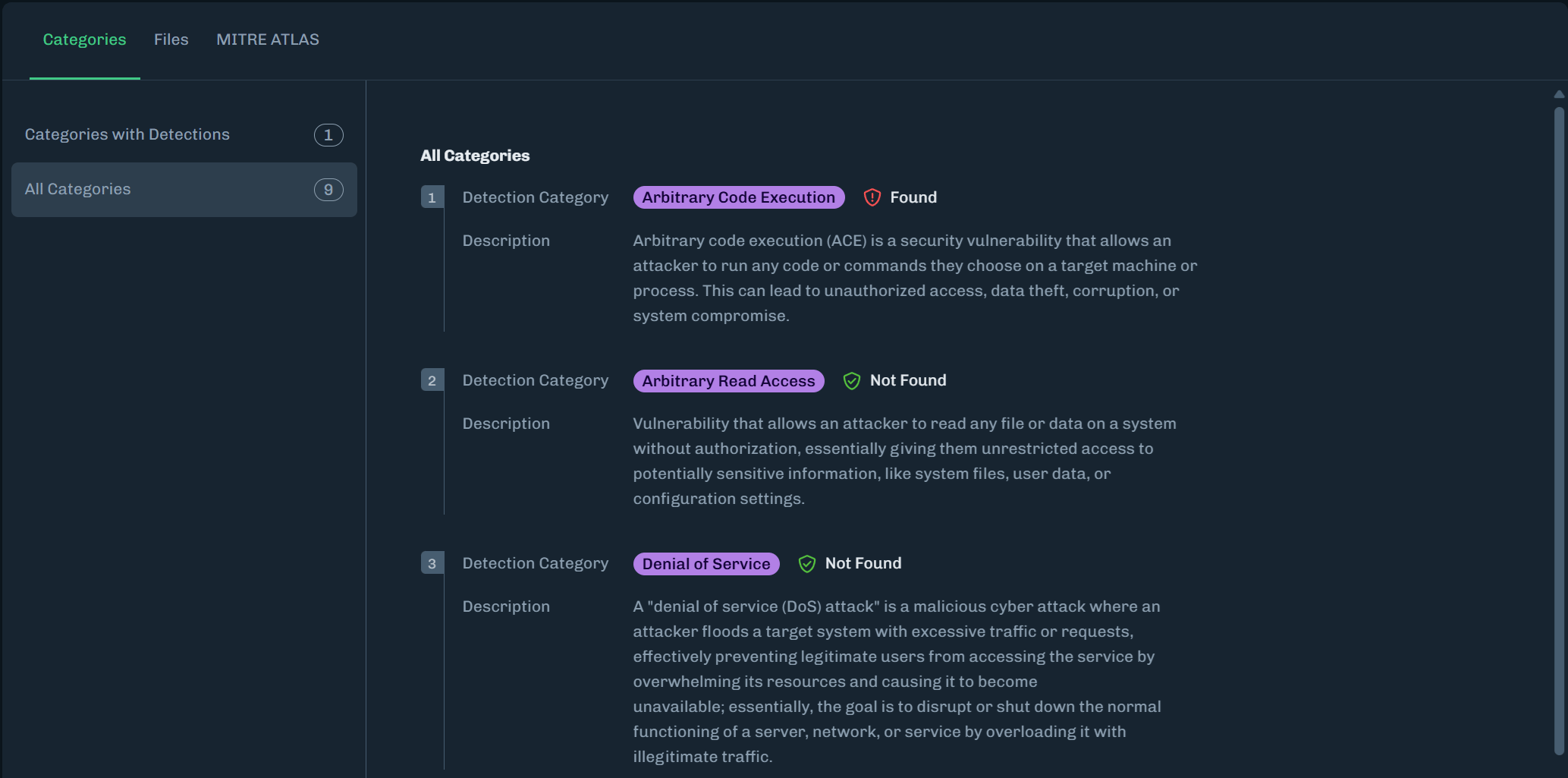
5. The Categories tab includes Detections and All Categories related to the scan results. See [Detection Categories](/docs/products/supply-chain/console/supply_chain_severity_levels) for more information.
   <Frame>
     <img src="https://mintcdn.com/hiddenlayer/DsUCbDX4m5h7lBi7/docs/products/supply-chain/console/images/model-inventory-scans-testscan-all-categories.png?fit=max&auto=format&n=DsUCbDX4m5h7lBi7&q=85&s=fa23262e7533108443c9b93594bb1ff7" alt="All Categories" width="2067" height="1025" data-path="docs/products/supply-chain/console/images/model-inventory-scans-testscan-all-categories.png" />
   </Frame>

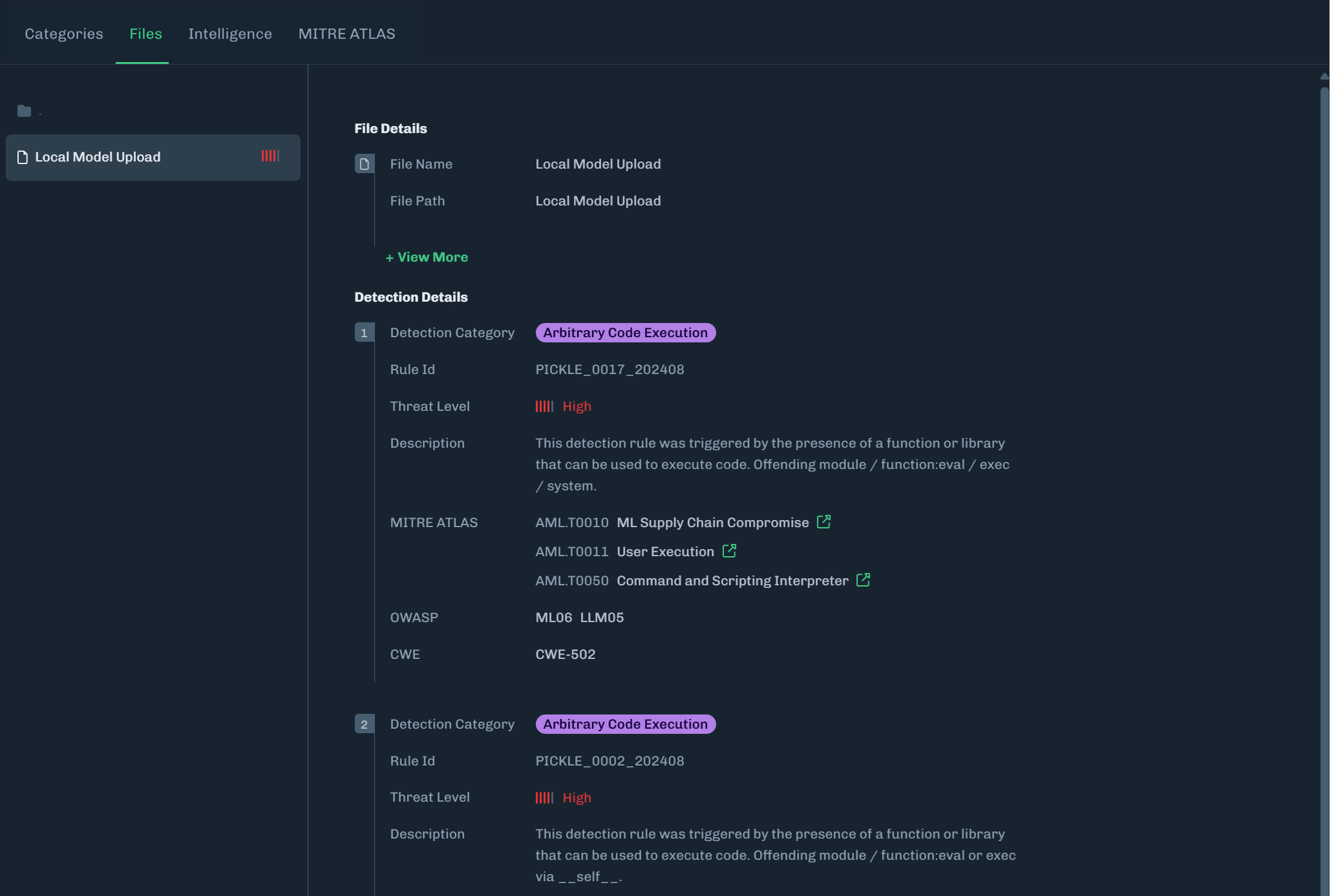
6. The Attributes tab includes a list of files related to the scan and details about the selected file.
   <Frame>
     <img src="https://mintcdn.com/hiddenlayer/DsUCbDX4m5h7lBi7/docs/products/supply-chain/console/images/model-inventory-scans-testscan-files.png?fit=max&auto=format&n=DsUCbDX4m5h7lBi7&q=85&s=7d47cf447de9d009749e1b317e945132" alt="Attributes" width="2067" height="1387" data-path="docs/products/supply-chain/console/images/model-inventory-scans-testscan-files.png" />
   </Frame>

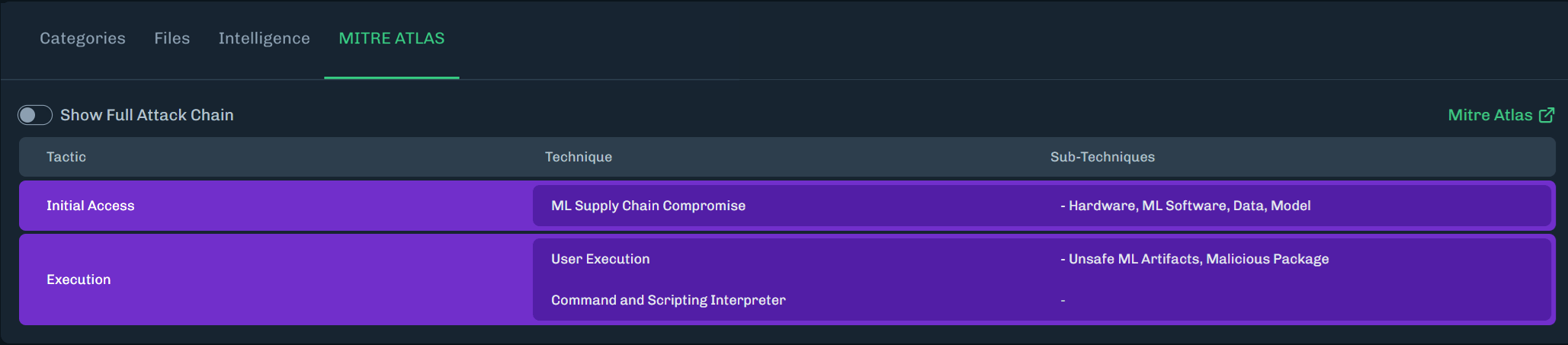
7. The MITRE ATLAS tab highlights MITRE ATLAS techniques related to the scan.

   * Click **Show Full Attack Chain** to see all MITRE ATLAS techniques.
   <Frame>
     <img src="https://mintcdn.com/hiddenlayer/DsUCbDX4m5h7lBi7/docs/products/supply-chain/console/images/console-model-inventory-detection-summary-mitre-atlas.png?fit=max&auto=format&n=DsUCbDX4m5h7lBi7&q=85&s=448feffa28f92e329f0bad495f7ec186" alt="MITRE ATLAS" width="2057" height="453" data-path="docs/products/supply-chain/console/images/console-model-inventory-detection-summary-mitre-atlas.png" />
   </Frame>

## Column Descriptions

<table><thead><tr><th data-label="Column">Column </th><th data-label="Description">Description</th></tr></thead><tbody><tr><td>Scan</td><td>The name of the model scanned.</td></tr><tr><td>Version</td><td>The version ID for the scan.</td></tr><tr><td>Detections / Files</td><td>The number of severities found over the total number of files discovered in the scan.</td></tr><tr><td>Advisories</td><td>Known files of concern, but are not exploits in and of themselves. Advisories should be reviewed prior to model usage.</td></tr><tr><td>Scanned On</td><td>The date and time of the scan.</td></tr><tr><td>Scan Policy Status</td><td>The status displays Compliant or Noncompliant based on the policy assigned. Unknown usually means no policy is assigned.</td></tr><tr><td>Region</td><td>Displays the region where the files are located, if available.</td></tr><tr><td>Provider</td><td>Displays the cloud provider, if available.</td></tr><tr><td>Scanner Version</td><td>Supply Chain scanner version used to scan the model.</td></tr><tr><td><p>Origin</p></td><td><p>Where the scanned model was found and how the scan was started.</p><p>This is displayed as <code>\[Platform or Catalog] | \[Initiation Method]</code>.</p><ul><li><p><strong>Platform or Catalog</strong>: Where the scanned model was found.</p><ul><li><p>Sources identified by HiddenLayer include:</p><ul><li>Unknown Origin</li><li>Hugging Face</li><li>Local File System</li><li>databricks</li><li>S3.</li></ul></li></ul></li><li><p><strong>Initiation Method</strong>: How the scan job was started in HiddenLayer.</p><ul><li><p>HiddenLayer initiation methods include:</p><ul><li>UI Upload: Scan started from the Console, using a local file upload or community scan.</li><li>API Upload: Scan started from the HiddenLayer API.</li><li>Integration: Scan started automatically by a configured integration.</li><li>Unknown Source: Initiation method could not be determined.</li></ul></li></ul></li><li><p>Example combinations:</p><ul><li><code>Hugging Face | UI Upload</code> - Hugging Face model scanned by the Console community scan; manually initiated by a user.</li><li><code>Databricks Unity Catalog | Integration</code> - Databricks artifact scanned via a HiddenLayer integration.</li></ul></li></ul></td></tr><tr><td>Actions</td><td><ul><li><strong>Model Intelligence</strong>: Delivers critical insights into model architecture, ancestry, and task alignment to support trust, security, and compliance in AI deployment. See <a href="/docs/products/supply-chain/console/supply_chain_model_intelligence" target="_self">Model Intelligence</a> for more information.</li><li><strong>AIBOM</strong>: Provides an inventory of AI artifacts for every scanned model in an industry-standard SBOM format, empowering security and data science teams to track AI components, vulnerabilities, and ensure compliance with regulatory standards.</li></ul></td></tr><tr><td>Threat Level</td><td>The severity level of the scan.</td></tr></tbody></table>
