Skip to content

Command-Line Arguments

Volume Mounts

Volume Mounts
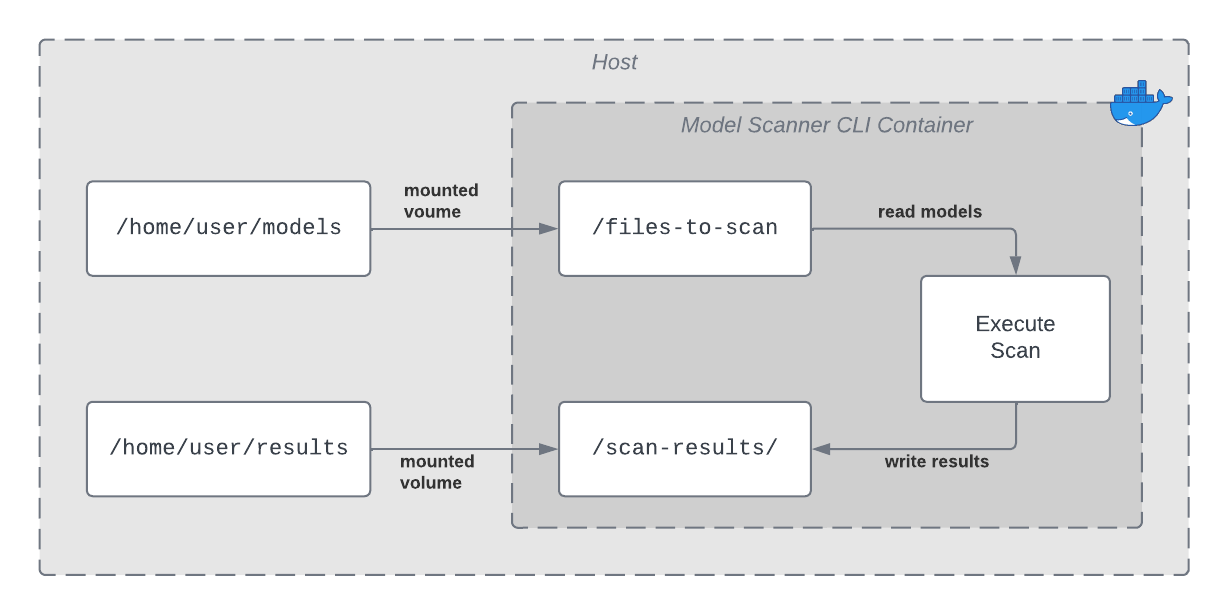
  • Model Scanner CLI requires its input - the model(s) to be scanned - to be made available to the running Docker container through a mounted volume.
  • Model Scanner CLI can optionally write scan results to a file within a mounted volume.
  • All file paths provided in command-line argument to the container are with respect to the container’s file system, not the local file system.
  • See the Docker documentation for more information.

Example

  • Suppose that the models to be scanned are located on the local machine in /home/user/models.
  • Model Scanner CLI’s scan results should be output to the local machine in /home/user/results.

In this case, volume mounts could be specified as follows:

docker run --rm \
  -e HL_LICENSE \
  -v /home/user/models:/files-to-scan \
  -v /home/user/results:/scan-results \
  quay.io/hiddenlayer/distro-cli-modelscanner:latest \
  --input /files-to-scan \
  --output /scan-results/results.json
Model Scanner Version

This example runs the latest Model Scanner CLI image. Change the Model Scanner CLI version if you want to pull a different Model Scanner version.

Model Scanner CLI

Input

ArgumentRequiredExample UsageDescription

--input {{file}}

yes

--input /files-to-scan/my_model.torch

An absolute file or directory path to scan:

  • Must be a path that is accessible through the Docker container filesystem. See Volume Mounts below for more information.

  • Each directory provided, if any, is recursively traversed.

  • Takes precedence over both the --include-pattern and --exclude-pattern flags. An individually specified file in the --input flag will be scanned even if it does not match any specified --include-pattern and/or matches any specified --exclude-pattern.

  • A presigned URL to a single object in Amazon S3.

  • A URL with a shared access signature to an object in Azure Blob Storage.

  • A protocol specific URL for Blob Storage.

    • Amazon S3: s3://some-bucket/some-prefix
    • Google Cloud Storage: gs://some-bucket/some-prefix
  • A Hugging Face repository URL that includes the username and repository name. See Scan a Hugging Face Repository for more details and examples.

    • https://huggingface.co/{{username}}/{{repo_name}}
    • Can scan private or gated repositories with Hugging Face token.

-e

yes

-e HL_LICENSE,
-e HL_CLIENT_ID,
-e HL_CLIENT_SECRET

Set the environment variables.

  • The Model Scanner CLI uses HL_LICENSE for the license.
  • For Hybrid mode, use HL_CLIENT_ID and HL_CLIENT_SECRET to set the API key and secret.
--include-patternno--include-pattern "*.h5" --include-pattern "*.rds"
  • If not provided (default):

    • Model Scanner CLI will consider every file discovered by --input to be eligible for inclusion in the scan.
  • If provided:

    • Specifies a glob to use for matching filenames.
    • Can be provided multiple times to specify multiple globs.
    • Candidate files discovered by --input will be included if they match any of the globs.
--exclude-patternno--exclude-pattern "*test*"
  • If not provided (default):

    • Model Scanner CLI will consider every file discovered by --input to be eligible for inclusion in the scan.
  • If provided:

    • Specifies a glob to use for matching filenames.
    • Can be provided multiple times to specify multiple globs.
    • Candidate files discovered by --input will be excluded if they match any of the globs.
    • Takes precedence over --include-pattern. Files matching any --exclude-pattern will be excluded, even if they match an --include-pattern.

--deep-hashing

no

--deep-hashing

Calculates MD5, SHA1, and SHA256 hashes. These are not calculated by default.

  • Note: Scans may take longer to complete with this flag enabled.

Glob Syntax

Some of the input arguments for the Model Scanner CLI allow the user to specify one or more globs to use for matching certain file path patterns. The following tokens can be used within globs to specify matching patterns:

  • *: matches any (possibly empty) sequence of non-special characters

    • Special characters are *, ?, \\, and [
  • ?: matches any single non-special character

Output

ArgumentRequiredExample UsageDescription
--output {{file}}no--output /scan-results/output.json
  • If not provided (default):

    • Scan results are not written to any file.
    • Scan results are echoed to stdout.
  • If provided:

    • Note: We recommend providing a path to a file that is on a mounted volume, so that the written file will be easily available locally.

    • Specifies an absolute path to a file to which scan results are written.

      • Results are formatted as JSON regardless of the extension of the file.
    • Must be a path that is accessible through the Docker container filesystem.

    • Scan results are not echoed to stdout.

--output-format {{v3|sarif|cyclonedx-json}}no--output-format sarif
  • If not provided (default):

    • Scan results will be in the v3 schema format.
  • If provided:

    • SARIF output, which is an open standard for static analysis results
    • OWASP CycloneDX is a full-stack Bill of Materials (BOM) standard and outputs the HiddenLayer AI Bill of Materials (AIBOM)
--log-file <file>no--log-file /mnt/volume/log.json
  • If not provided (default):

    • Scanner logs are not written to any file.
    • Scanner logs are echoed to stderr.
  • If provided:

    • Note: We recommend providing a path to a file that is on a mounted volume, so that the written file will be easily available locally.

    • Specifies an absolute path to a file to which scanner logs results are written.

      • Results are formatted as new-line separated JSON blobs, regardless of the extension of the file.
    • Must be a path that is accessible through the Docker container filesystem.

    • Scanner logs are not echoed to stderr.

--detections-are-errors

no

--detections-are-errors

Specifies whether scan results should drive exit code.

  • If not provided (default), Model Scanner CLI’s exit code will be:

    • 0, if:

      • No detections are found in the input model(s), or
      • Detections are found in the input model(s)
    • = 1, if:

      • An internal error is encountered
  • If provided, Model Scanner CLI’s exit code will be:

    • 0, if:

      • No detections are found in the input model(s)
    • = 1, if:

      • Detections are found in the input model(s), or
      • An internal error is encountered

--persist

no

--persist

If provided, you can add the scan results to an existing model in the AISec Platform Console.

  • Note: Optionally, you can use --model-name and --model-version to specify the model’s name and version for the scan. If this data is not provided, these values will be automatically populated.

--model-name

no

--model-name=testmodel

If you are using --persist, you can specify the --model-name to add the scan results to the existing model in the AISec Platform Console.

  • If a model name is not included, a unique UUID is generated (example: cli-25.4.0-f348a46e-d0f8-4ac4-8f1a-73ae02a2fe75).

--model-version

no

--model-version=2

If you are using --persist, you can specify the --model-version to increment the scan results version for an existing model in the AISec Platform Console.

  • If a version is not included, the Unix time at the start of the scan is used.
  • If you use a version that already exsists for the model, the scan results are overwritten.