

How it works
Databricks Unity Catalog lets you register AI assets (models, MCP servers, external model providers) as securables. A service policy attached to a securable inspects the content of every interaction with it and returns a decision. HiddenLayer plugs in as an external service policy: Databricks calls the HiddenLayer endpoint, HiddenLayer evaluates the content, and HiddenLayer returns a verdict. HiddenLayer protects model traffic (Model Services and Model Provider Services) and MCP tool calls. With both phases enabled, which is what this guide recommends, Databricks calls HiddenLayer at two points in every exchange: once with the outbound request, once with the model’s response. Each call is independent and each gets its own decision, so a request can be allowed and its response still denied.A denied model call is not an HTTP error. On a Model Service or Model Provider Service, Databricks returns
HTTP 200 with a synthetic assistant turn. If you check status codes to detect blocks, you will miss all of them. See Step 4 for the fields to read instead. On an MCP Service, a denial is a JSON-RPC error with the reason in error.message (see Verify an MCP Service).Before you start
In Databricks
1. Enable the previews
In the account console, go to Previews, search for Enhanced Unity, and turn Enhanced Unity AI Gateway On. The toggle keeps that name although Databricks now calls the product Unity Gateway. This is an account-level setting, so it needs an account admin, not just a workspace admin. Changes take a few minutes to take effect.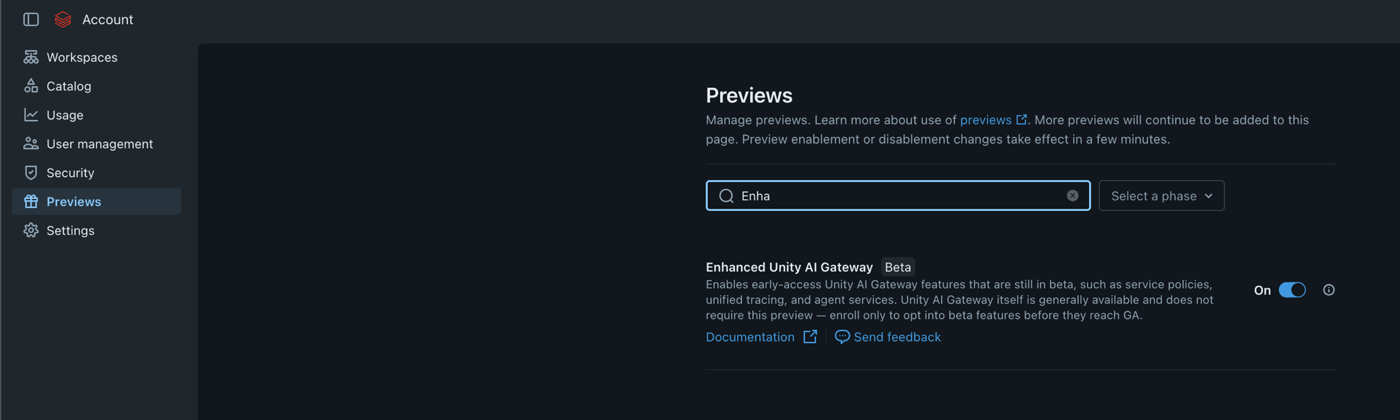
Service policies feature is not available.
2. A workspace in a supported region, with Unity Catalog enabled
Unity Gateway runs on AWS, Azure, and GCP, but not in every region on each, and the supported regions differ per cloud. Check the Model serving features availability table for your cloud, where Unity Gateway has its own column: Azure, AWS, GCP.3. A securable to protect
A Model Service, a Model Provider Service or an MCP Service.- MCP Services: a policy evaluates each tool call and its result. Databricks governs the
tools/callmethod only, so the tool listing a server advertises is never sent to a policy. - Agent Services cannot have a policy attached during the Databricks Beta.
4. Privileges for each step
These can be different people. If whoever attaches the policy lacks
CREATE CONNECTION, the person who holds the HiddenLayer credential can create the connection first and grant them USE CONNECTION. Confirm who holds each before you start.
In HiddenLayer
1. A HiddenLayer tenant, and its region
The Console host tells you which: aconsole.us URL means you use the api.us endpoints. Use the row matching your region for the rest of this guide.
2. A client credential with three permissions
Databricks authenticates with OAuth Machine to Machine, so it needs a HiddenLayer client credential (a Client ID and Client Secret). A HiddenLayer API key does not work here. Create the client credential in the HiddenLayer Console for your region:- Create a new client credential.
- Enter a name and select an expiration, from 7 days to 1 year.
- Select these permissions: Interactions Write, Project Read, Policy Read.
- Copy the Client ID and Client Secret and store them in a secrets manager. You enter both in Step 1.
3. A project whose policy has detection rules
- A project is associated with a policy, and that policy is where the detection rules are configured.
- A policy with no rules evaluates every call and allows all of them. The integration looks broken when it is merely empty.
- To use a project other than your Default Project, open Runtime Security → Projects and copy its ID with the copy button on the project’s card. You’ll paste it as
project_idin Step 2. See Projects to create one. - To run the blocked call in Step 3, make sure the policy has a prompt injection rule under BLOCK.
On your network
If your account restricts serverless outbound access with a network policy, governed calls to HiddenLayer are denied until the HiddenLayer API hostname for your region is an allowed domain. Databricks recommends a restricted-access network policy that allows only approved policy service destinations; see External service policies. Add:- US:
api.us.hiddenlayer.ai - EU:
api.eu.hiddenlayer.ai
- Enter the hostname, not an IP address. Allowed domains take a DNS name only.
- A network policy is an account-level object. An account admin makes the change, and serverless egress control requires the Enterprise tier.
- Where: account console → Security → Networking → Context-based ingress & egress control → your policy → Egress → Allowed domains → Add destination.
- On a Model Provider Service, also allow the provider’s hostname (for example
api.openai.com). The upstream model call goes through the same network policy. - The connection you register in Unity Catalog is not allowed automatically: governed calls to a host missing from the policy are denied.
system.access.outbound_network system table, where calls to HiddenLayer appear with network_source_type external_model.
Databricks advises reviewing a vendor’s data-handling practices before you attach an external policy, because the content of your prompts and responses is sent to that partner for evaluation. HiddenLayer’s statement is Product data collection and handling.
Step 1: Create the Unity Catalog connection
A connection tells Databricks where HiddenLayer lives and how to authenticate to it. Create it in the UI or with the CLI. Databricks validates the credential when you save the connection by performing the full OAuth exchange, and rejects a bad Client ID or secret with anOAuth token exchange failed with HTTP status code 401 Unauthorized error. A credential problem fails here, rather than showing up later as “everything is denied”.
This check does not go through your serverless network policy, so a successful save does not prove governed calls can reach HiddenLayer. See On your network.
Create it in the UI
In your workspace, open Catalog, click the + button, and choose Create a connection.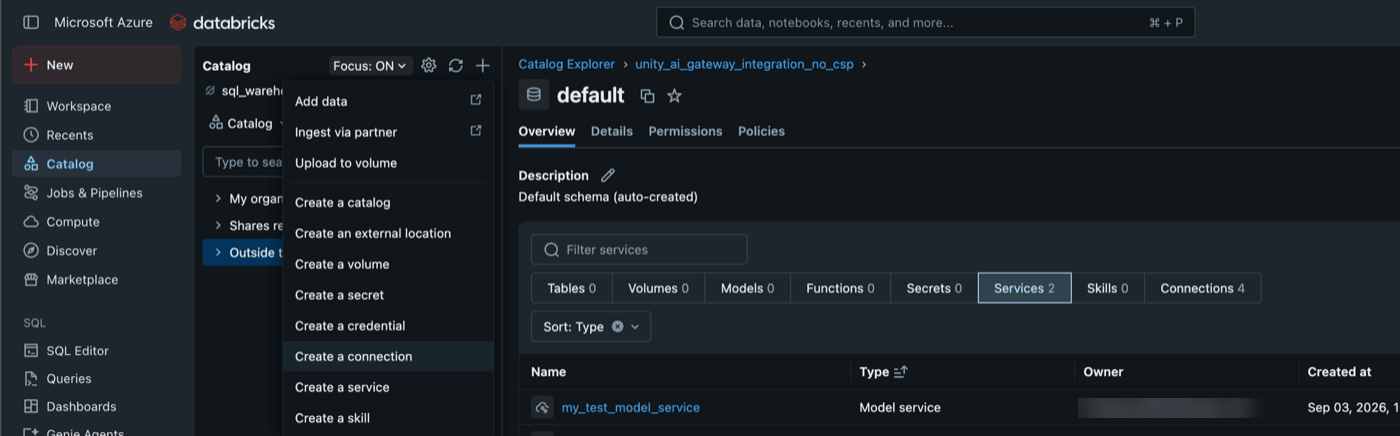
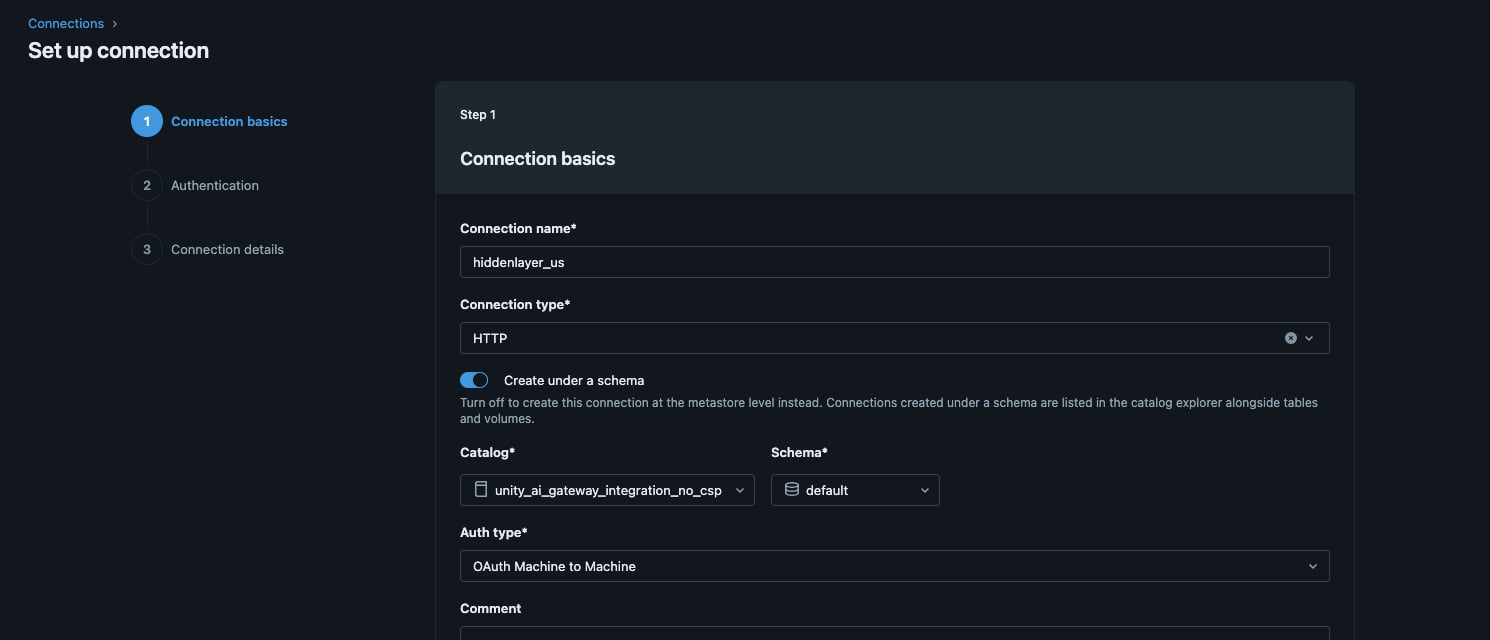
Connection basics
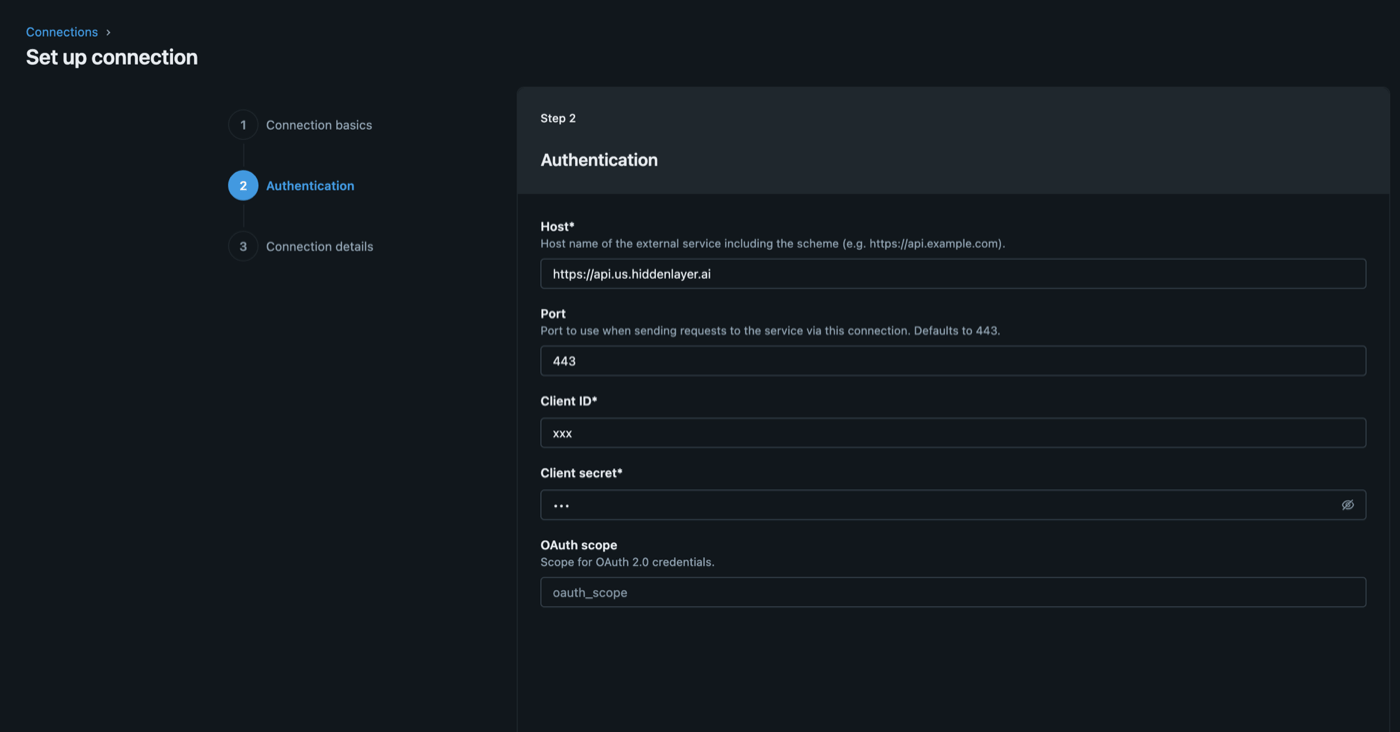
Authentication
Connection details
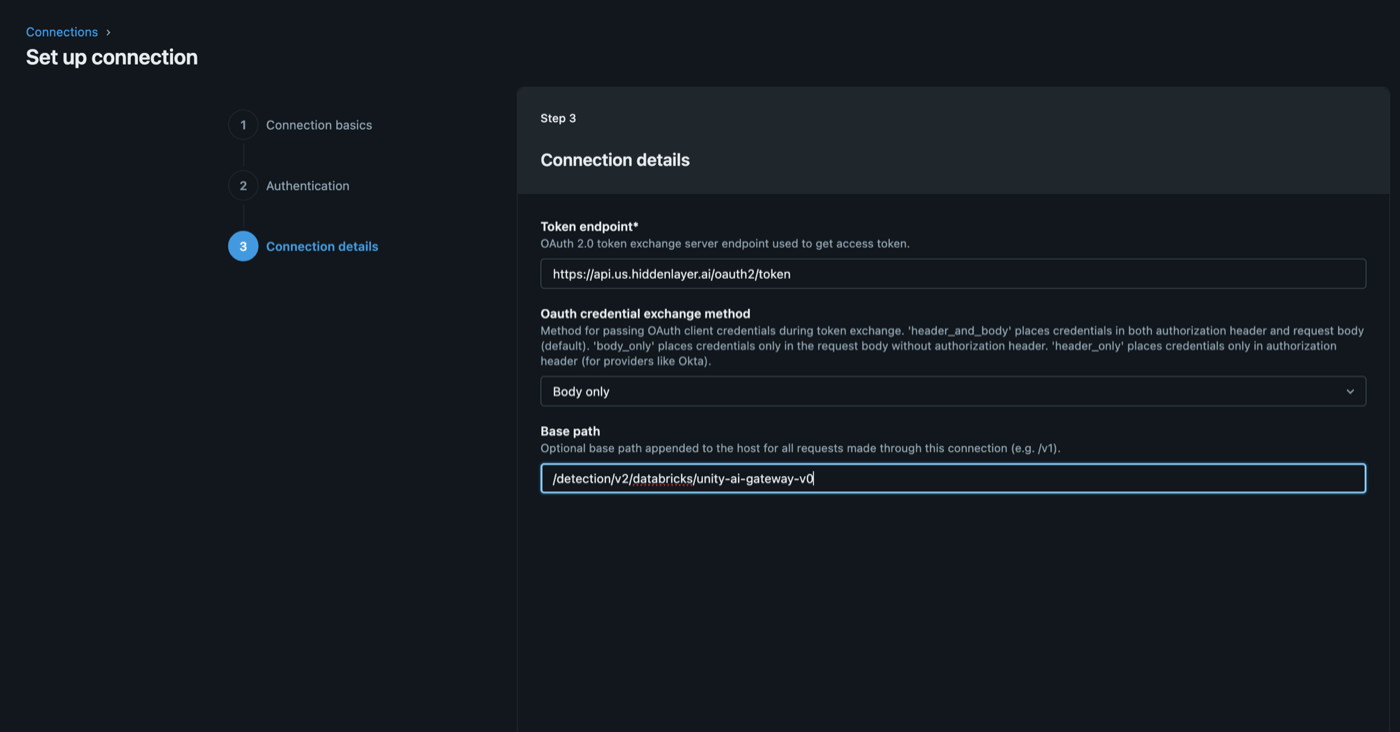
Base path is exact, and the
-v0 suffix is part of it, not a placeholder: it tracks the Databricks external-policy contract version. A typo here produces a connection that validates and then denies every call once attached.Oauth credential exchange method: the HiddenLayer token endpoint accepts all three: Body only, Header and body (the default in the policy form), and Header only. Any of them works.Create it with the CLI
Use the CLI if you are scripting environments.--parent is what makes the connection schema-level. The exchange method can be omitted; the default works.
connections list shows only metastore-level connections, so a correctly scoped connection is absent from that list:
Step 2: Attach the policy to a securable
Attach the policy in the UI or with the API. It goes on a Model Service, a Model Provider Service or an MCP Service.Call a Model Provider Service on its provider’s native paths. For an OpenAI provider service, those are
/ai-gateway/openai/v1/chat/completions, /ai-gateway/openai/v1/responses and /ai-gateway/openai/v1/embeddings. The mlflow and anthropic paths are evaluated on the input phase and then rejected with HTTP 400 Unsupported native_api_type for OpenAI v1 surface.With a policy attached, Databricks rejects unmanaged paths with HTTP 400, whether Forward all URL paths is on or off: AI Gateway cannot apply Service Policies to opaque unmanaged requests. One OpenAI path still reaches the provider without evaluation; see Traffic that does not reach a service policy.Attach it in the UI
In the workspace sidebar, click AI Gateway. The page it opens is titled Unity Gateway, with Models, Providers and MCPs tabs. Open the securable’s Policies tab and click New policy:- Model Service: Unity Gateway → Models → your model service → Policies.
- Model Provider Service: Unity Gateway → Providers → your provider service → Policies.
- MCP Service: Unity Gateway → MCPs → your MCP service → Policies.
reason in error.message; step 3 shows one.
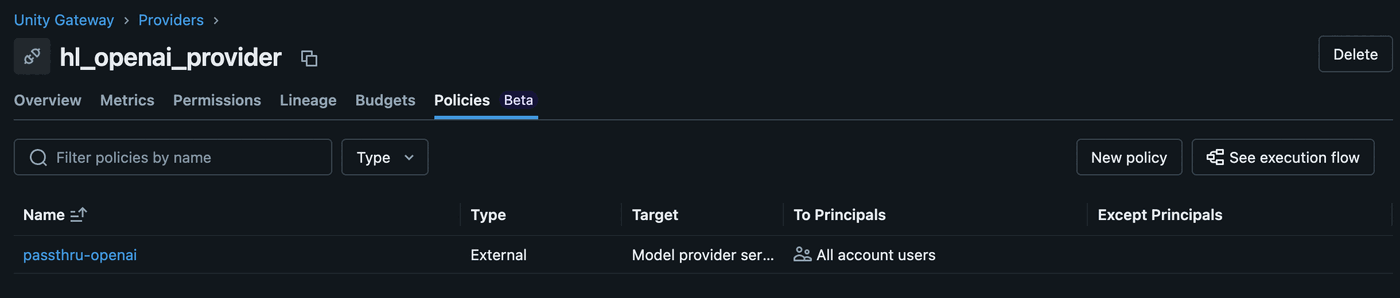
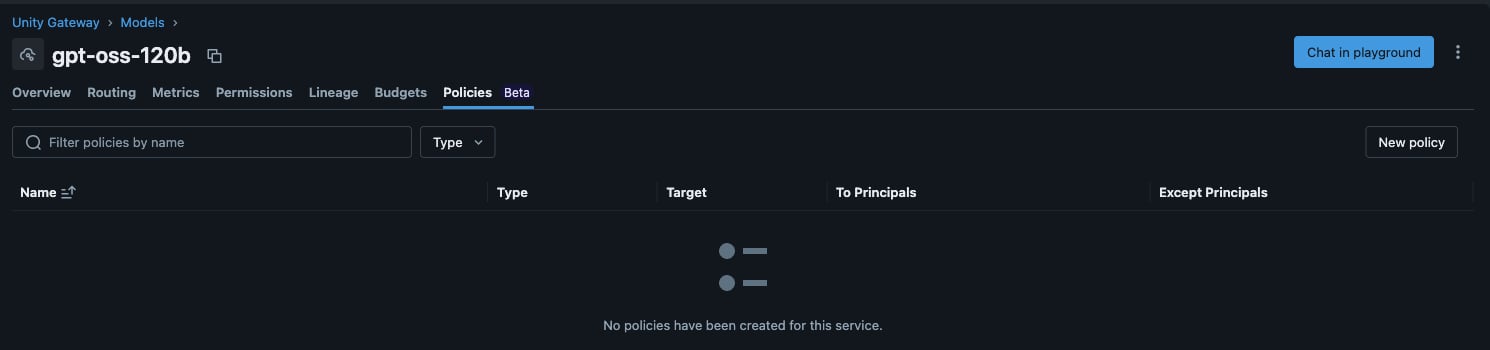
The policy is bound to wherever you started. The form’s Scope field is read-only. It shows the service whose Policies tab you clicked New policy from, as a three-part name, for example
system / ai / gemma-3-12b. Check it before filling anything else in. If it names a service you did not mean to protect, cancel, go back to Unity Gateway → Models, Providers or MCPs, open the right one, and start again.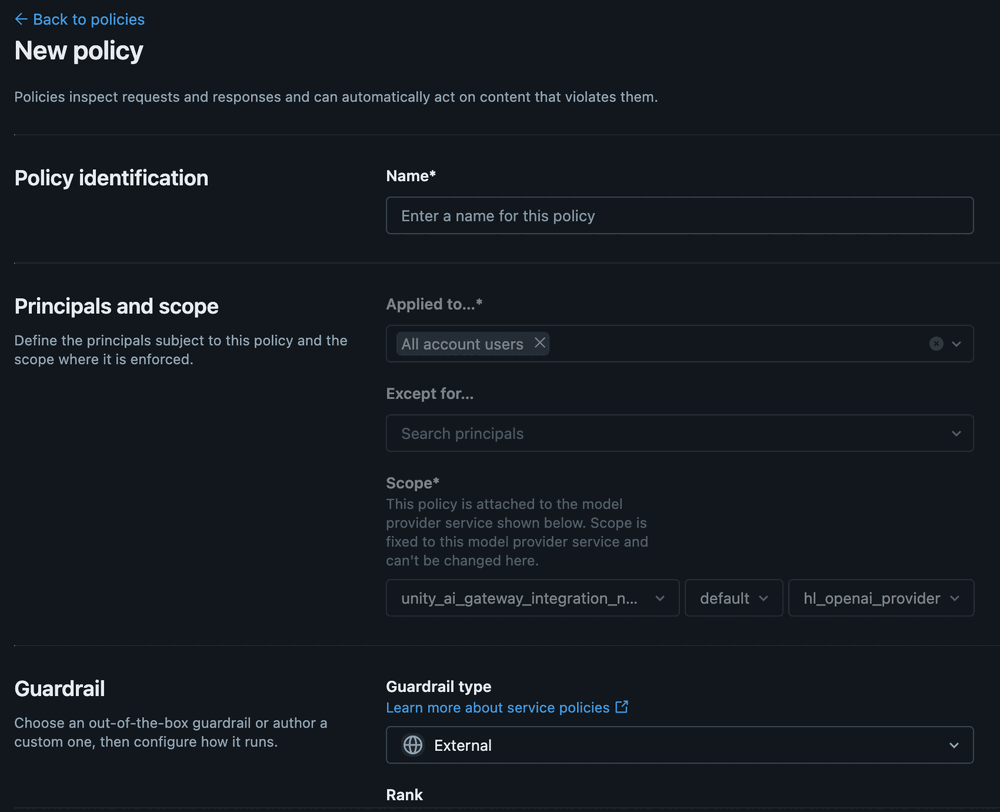
Name, principals, and guardrail type
Give the policy a name, decide who it applies to, then set Guardrail type to External, the option for third-party providers like HiddenLayer. The others in that list (Sensitive Data Detection, Unsafe Content, Jailbreak, Hallucination, Custom) are Databricks’ own guardrails and do not involve HiddenLayer.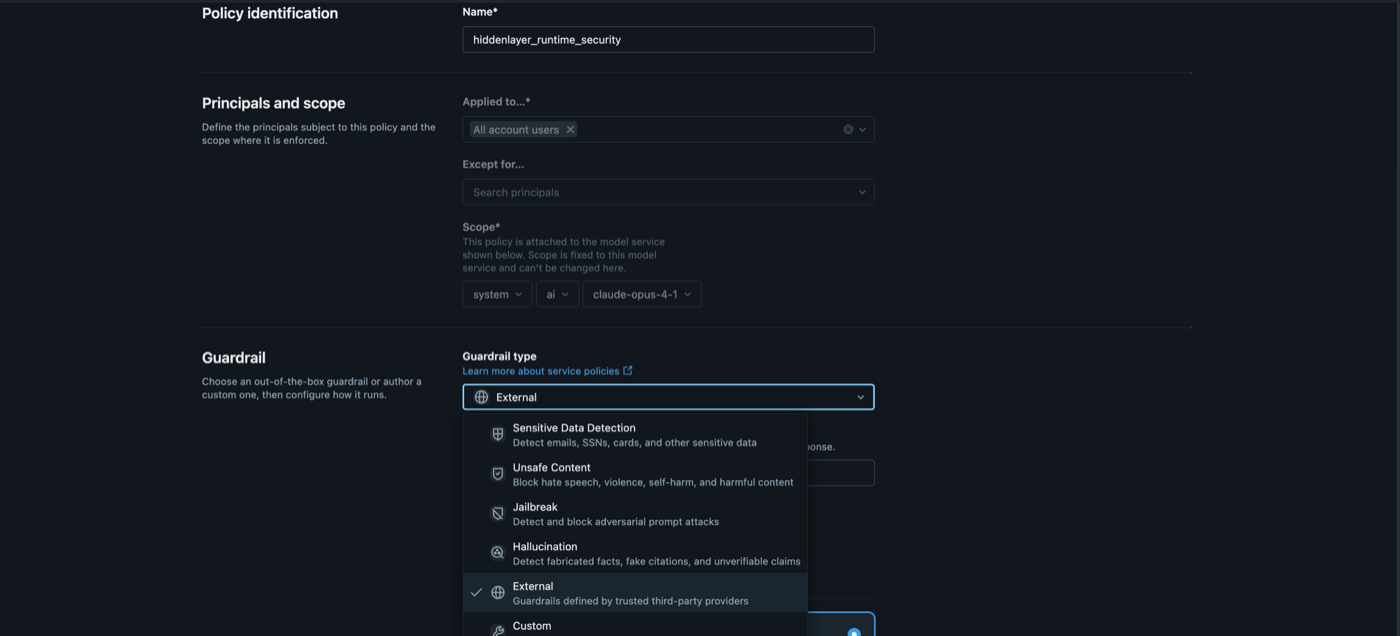
Rank and phase
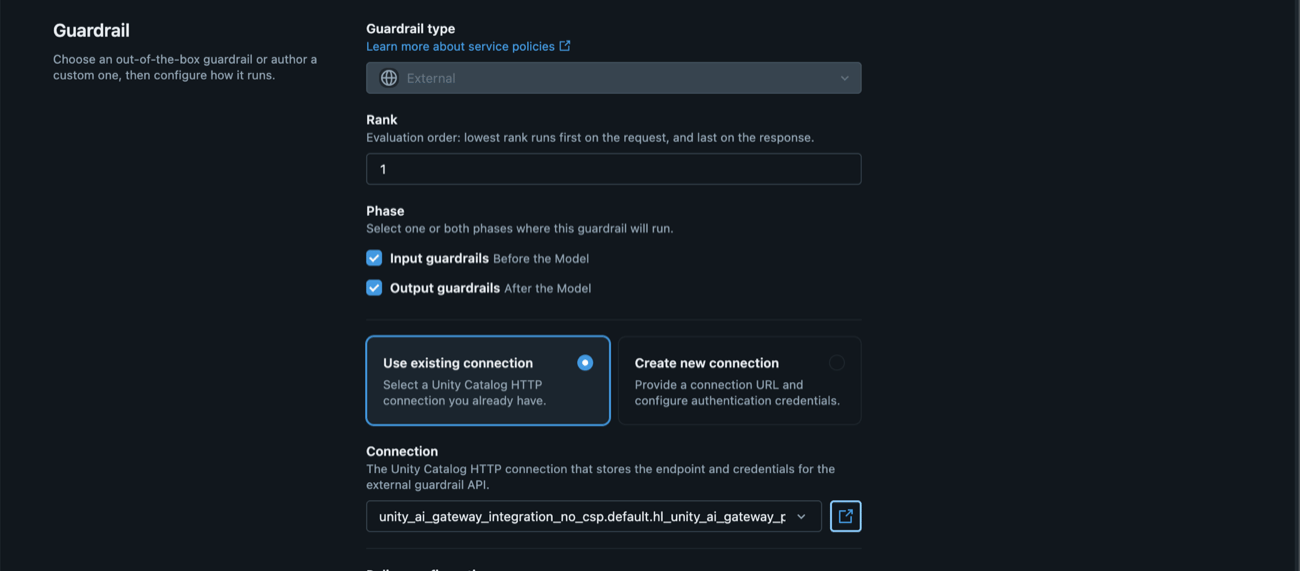
Point it at your connection
Choose Use existing connection and pick the connection you created in step 1. The picker browses by catalog and schema, which is the other reason a metastore-level connection is unusable here.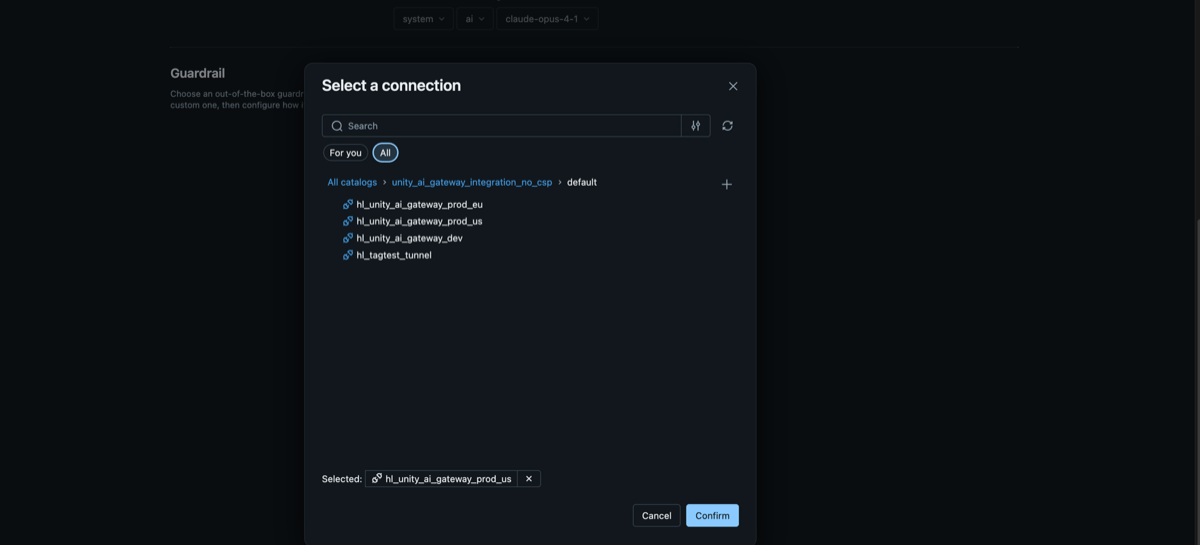
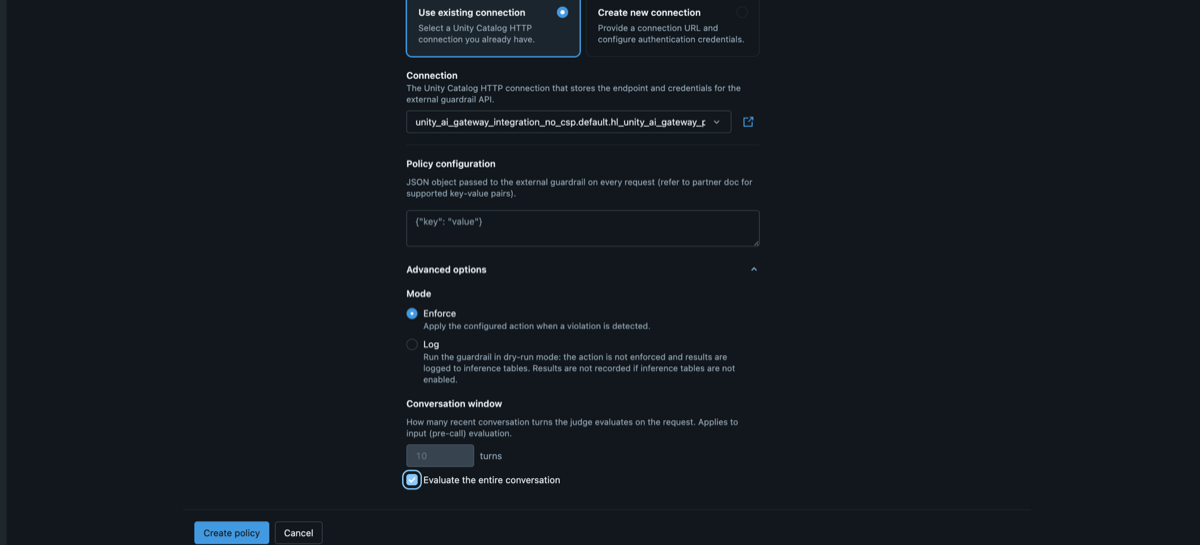
Policy configuration and advanced options
Policy configuration is optional. Leave it empty and HiddenLayer evaluates against your tenant’s default project with no attribution label. Supply a JSON object to change either; both keys are optional (see the reference).project_idselects which HiddenLayer policy evaluates this traffic. Supply it when the policy you want is not the one on your Default Project. Copy the ID from the project’s card under Runtime Security → Projects.requester_idis a label that tells traffic from this attachment apart from other sources in the HiddenLayer Console.
The form does not show
on_error or timeout_ms. Those are set through the API; see Attach it with the API.

Attach it with the API
PATCH the model service with update_mask=config.service_policies. The same request works on an MCP Service at /api/2.1/unity-catalog/mcp-services/<catalog>.<schema>.<service>. Only the policy list changes, but the body replaces the whole list: any policy you leave out is removed. Read the current list, swap in yours, and write it back with the etag from the read, so the write fails rather than overwriting a change someone made in between.
Every option value is a string, including numbers and booleans. If the service changed after the read, the PATCH fails with
etag mismatch: the resource was modified since it was last read. Re-read the resource and retry. Run the whole script again; don’t resend the old body.json. Other policies on the service keep their ranks; change rank: 1 if HiddenLayer should run at a different point in the order. To remove the integration, write the list back without your policy. Changes take 1–2 minutes to propagate.
Databricks documents attaching external service policies as UI-only (see Limitations in External service policies). This API call worked in our tests, but Databricks does not document it, so it may change.
Log or Enforce
The two modes send identical traffic to HiddenLayer. The difference is whether Databricks acts on the verdict, and how HiddenLayer records it: under Log, a call that Enforce would block, including through a REDACT LIST entity, is recorded as a detection (DETECT), because nothing was enforced.- Log: the decision is recorded, and the call proceeds either way. This includes evaluation errors: under Log, a timeout or an unreachable HiddenLayer does not deny the call, even with
on_errorset toDENY. - Enforce: a deny stops the call. Under Enforce, an evaluation error also denies, per the fail-closed behaviour below.
If you choose Log mode: if unified tracing is set up, Databricks records each evaluation in its unified trace table as a
policy_evaluated event, with the would-be verdict in policy.dry_run_action and policy.dry_run_reason. A metastore admin sets up tracing once, under AI Gateway → Govern → Traces → Set up tracing, and other readers need access granted. Databricks delivers trace records on a best-effort basis, so an evaluation can be missing from the table. Databricks also records it in inference tables if they are enabled. The HiddenLayer Console records every interaction too, with a would-be block shown as DETECT and the rule that matched.Fail-closed behaviour
Under Enforce, a call is denied whenever Databricks does not get a usable verdict from HiddenLayer. Two places can produce that denial, and thereason field tells them apart (see step 4).
- Databricks cannot get a verdict. HiddenLayer is unreachable, the token exchange fails, HiddenLayer returns a non-2xx status, the request runs past its timeout, or a network policy blocks the host. Databricks denies the call with a
reasonstartingexternal policy evaluation failed:. The timeout Databricks sent on every call we observed is5000ms. - HiddenLayer is reached but cannot finish the evaluation. HiddenLayer follows the attachment’s
on_errorsetting, which Databricks sends with every call:DENYreturns a denial with a HiddenLayer reason, andALLOWlets the call through.
Step 3: Verify it works
Call your governed model on one of the governed paths listed in the reference. This call uses the unified Chat Completions path, which works for any model service regardless of the underlying provider. To verify a Model Provider Service instead, use its provider’s native path (for an OpenAI provider,/ai-gateway/openai/v1/chat/completions), add the header Databricks-Model-Provider-Service: <catalog>.<schema>.<service>, and set model to a model the provider serves. Other paths under /ai-gateway/ are not necessarily evaluated (see What HiddenLayer governs).
HTTP 200, withfinish_reasoncontent_filtercontent:This request was blocked by the '<policy>' service policy.databricks_service_policy:actiondeny,phasepre_call,reasonBlocked by HiddenLayer policy.usageall zero
Verify an MCP Service
Call one of the service’s tools at$DATABRICKS_HOST/ai-gateway/mcp-services/<catalog>.<schema>.<service> from your MCP client, once with ordinary arguments and once with the same prompt injection as an argument. The tools/call request looks like this:
-
The ordinary call returns the tool’s normal
result. -
The prompt injection returns
HTTP 200with a JSON-RPC error, and the tool never runs:
tool_use:<tool> with its arguments, Tool Used names the tool, Provider is databricks.<catalog>.<schema>.<service>, and Rules Matched shows the rule with a BLOCK action. An allowed call records two interactions: tool_use:<tool> for the call and tool_result:<tool> for the tool’s result.
Where to look: the HiddenLayer Console
Every evaluated call produces an interaction with its detections, whether it was allowed or denied. Open Runtime Security → Investigate and find your session.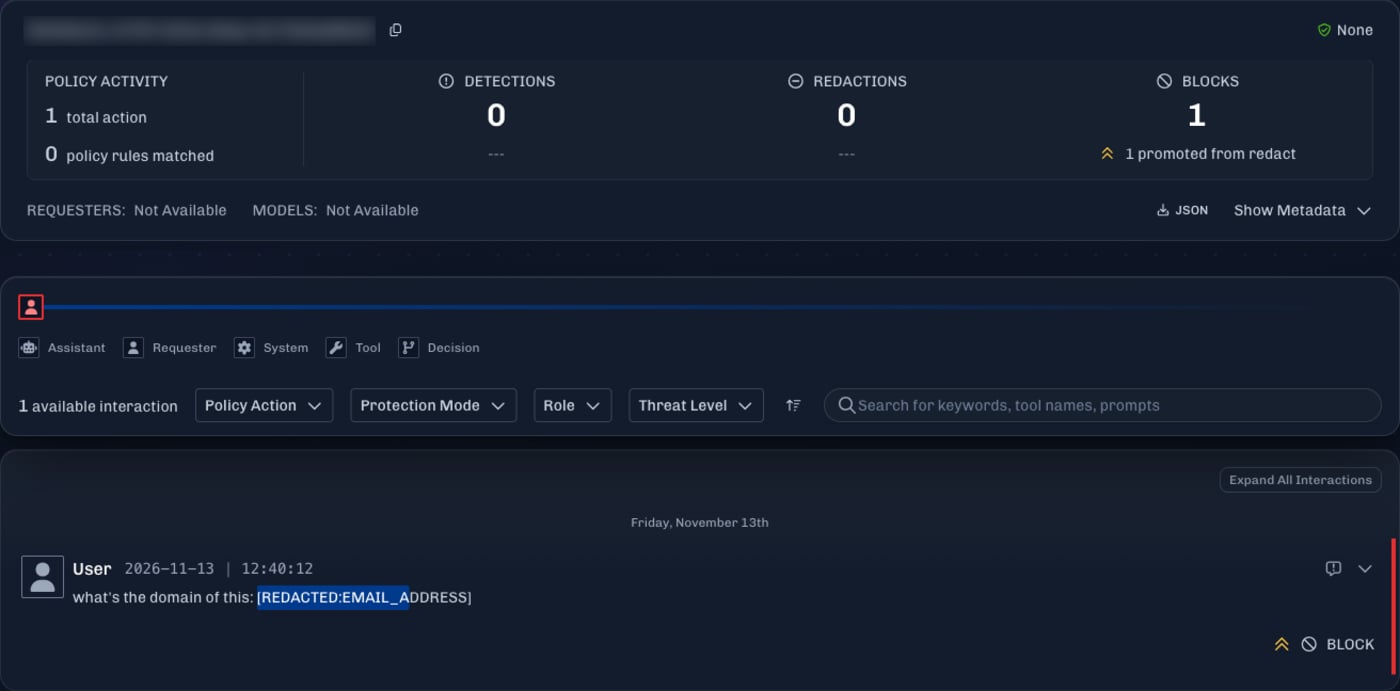

Why Model can be blank. On traffic from the Databricks AI Playground, Model shows
---. The Playground routes by the securable it was opened against and does not send a model field. Use Provider to identify the governed service instead. Calls from your own applications, which send model, populate the field normally.Step 4: Anatomy of a denial
When a policy in Enforce mode denies a call, Databricks replaces the model response with a synthetic completion. In the Databricks AI Playground, a denial looks like an ordinary assistant reply. Here the BLOCK rule on prompt injection stops the request:

Both messages name the Databricks policy (
hl-external here) and say nothing about which rule fired. That is Databricks’ text. The rule that fired is in the HiddenLayer Console.databricks_service_policy.reason:
Blocked by HiddenLayer policy.: HiddenLayer evaluated the call and a rule blocked it. The interaction and its detection are in the Console.- Text starting
The policy service could not …: HiddenLayer was reached but could not finish, for example “could not resolve its policy configuration” or “could not complete evaluation”. See Troubleshooting. - Text starting
external policy evaluation failed:: Databricks’ own text. No usable verdict reached Databricks, and the rest of the text says why. No interaction appears in the Console. See Troubleshooting for the variants.
What to expect
How each HiddenLayer policy action maps to what Databricks does:
A detection does not stop anything. Detect-only rules record a finding and let the call through, which is useful for measuring exposure before you enforce.
Latency
HiddenLayer evaluations are typically sub-second per phase, against a 5000 ms timeout. Two phases means two evaluations per exchange. In practice model inference dominates: a blocked call returns faster than an allowed one, because the model never runs.policy_config reference
The JSON object you supply on the attachment. Both keys are optional.This field has no validation or autocomplete. Unrecognised keys are ignored rather than rejected, and each key is read independently, so a typo in
requester_id does not discard a correct project_id. A typo’d project_id silently falls back to your default project, which is the most common cause of “my rules are not firing”.Request tags
A caller can set the project, requester and session for an individual call with the DatabricksDatabricks-Ai-Gateway-Request-Tags header, a JSON object of string keys and values. Databricks forwards the tags to the policy on Model Services, Model Provider Services and MCP Services, in both phases and in Log mode. See Databricks’ request tagging.
- A tag wins over policy configuration. Each key is resolved on its own, so a call can set
hiddenlayer_requester_idand keep the attachment’sproject_id. - An empty value counts as absent.
""ornullfalls back to policy configuration. - Only
hiddenlayer_tags are read. Other tags, including your ownproject_idorrequester_idtags for Databricks usage tracking, never change the project, requester or session. - Any caller of the governed service can set tags. A caller can choose another project in your tenant and set any
hiddenlayer_requester_id. If the caller chooses a project in Monitor Mode, HiddenLayer never denies their calls, even when the policy is set to Enforce. Databricks can still deny a call it gets no verdict for (see Fail-closed behaviour). - MCP clients must send the header on every request. Tags are read per HTTP request: tags sent only on
initializedo not reach latertools/callrequests. Databricks also passes the header on to the MCP server.
What HiddenLayer governs
Governed surfaces
A HiddenLayer policy evaluates calls that reach a governed Unity Catalog securable through Unity Gateway.Traffic that does not reach a service policy
Service policies are attached to Unity Catalog securables and evaluate calls routed to them. Some ways of invoking a model sit outside that path, so no service policy participates:ai_querybatch inference. Databricks documents that forai_queryworkloads “only usage tracking applies”: guardrails, rate limits, inference tables, and fallbacks do not./ai-gateway/openai/v1/completionson a Model Provider Service. The legacy Completions path is forwarded to the provider without evaluation, whether Forward all URL paths is on or off.- Direct
/serving-endpoints/access. Those paths address serving endpoints rather than Unity Catalog securables, so service policies do not apply. Use the/ai-gateway/paths in the reference for governed traffic.
Behaviour to plan around
- A redact rule denies the call rather than rewriting it.
- Streamed responses are evaluated in windows by default. Under the default Streaming evaluation, Databricks sends HiddenLayer the response several times as it grows, each time with all the text so far, and releases approved text before the model finishes. A long answer can produce four or more evaluations, each recorded as its own interaction, and a block on a later window comes after earlier text has reached the caller. Choose Full response evaluation (API:
stream_modeSTREAM_MODE_FULLY_BUFFERED) to hold the stream until the whole response is evaluated. A denial then arrives as a singletext/event-streamchunk withiddatabricks-guardrail-blockandfinish_reasoncontent_filter, followed by[DONE]; no model tokens are sent first. - A conversation window truncates what is evaluated. Tick Evaluate the entire conversation unless you have a specific reason not to.
- Configuration changes take minutes to propagate: 1–2 minutes for a policy, and several minutes for a connection edit.
on_errorandtimeout_msare API-only. The policy form does not show them; see Attach it with the API.- Databricks does not send the calling user’s identity. Attribute users with a
hiddenlayer_requester_idrequest tag, or use separate attachments with distinctrequester_idvalues. Either way the requester is a label, not a verified identity: any caller can set the tag (see Request tags).
Troubleshooting
Rotate the client secret
The old secret stops working as soon as it is regenerated, and a connection edit takes several minutes to reach every Databricks replica. Regenerating in place therefore denies calls under Enforce until the edit propagates. To rotate without denials, switch to a second credential:- In the HiddenLayer Console, create a client credential with the same three permissions.
- In Databricks, edit the connection in place and replace the Client ID and Client secret, or run
databricks connections updatewith the newclient_idandclient_secret. Databricks runs a live token exchange on save and rejects a credential that does not work. - Wait several minutes, then send a throwaway call and confirm the interaction appears in the HiddenLayer Console.
- Delete the old credential.
Stop denials quickly
- Stop all denials from the Databricks side: open the policy and set Mode to Log. Under Log nothing is denied, including when evaluation fails.
- Stop denials from the HiddenLayer side: put the project in Monitor Mode. HiddenLayer never denies calls evaluated against it, even when the evaluation fails. Databricks still denies a call it gets no verdict for.
- Remove the integration: delete the policy from the service’s Policies tab.
Reference
HiddenLayer endpoint
Governed Databricks paths
Any of these reach a policy on a governed Model Service, which is named bymodel in the request body. A Model Provider Service is named by the Databricks-Model-Provider-Service header instead, and accepts only its provider’s native paths (see step 2).
Databricks documentation
- Service policies for AI securables: concepts, decisions, fail-closed behaviour, limitations
- Create and attach a service policy: the attachment flow
- Query model APIs (model services): every governed path, with examples
- External service policies: what Databricks sends to an external policy, including request tags
- Request tagging: the
Databricks-Ai-Gateway-Request-Tagsheader - HTTP connections: connection options and requirements
- AI governance with Unity Gateway: product overview
docs.databricks.com/aws/en/… and docs.databricks.com/gcp/en/….